blob: 0ea008de5f985582a0b7f78e2df99f63aa54ef66 (
plain)
1
2
3
4
5
6
7
8
9
10
11
12
13
14
15
16
17
18
19
20
21
22
23
24
25
26
27
28
29
30
31
32
33
34
35
36
37
38
39
40
41
42
43
44
45
46
47
48
|
---
layout: post
title: "Building bsimg.net: Project Log"
date: 2026-09-18
permalink: "/blog/building-bsimg-dot-net-project-log"
author: Benjamin Sanders
catagories: project, image host, portfolio
#subtitle: "Blueorgia is real, y'all!"
---
{: .header-img}
<small>Image Credit: Pexels, panumas nikhomkhai</small>
I need some projects to work on and write about here. So, this past week I got the idea to stand up a Debian 13 VM and try creating my own CDN of sorts to host images and other assets for this website.
## Starting Point
This idea was inspired by X/Twitter's `pbs.twing.com`, a dedicated image-serving subdomain separate from the main site, with on-the-fly size/format selection via query parameters (`?format=jpg&name=large`).
While I don't currently have on-the-fly size/format selection yet. I do currently upload three different image sizes for an image which are thumb, medium, and large.
I did rely heavily on Claude to "vibe code" this but my reason for wanting to write this article is to go over the project so I can cement what I did in my memory.
## Standing Up The Server
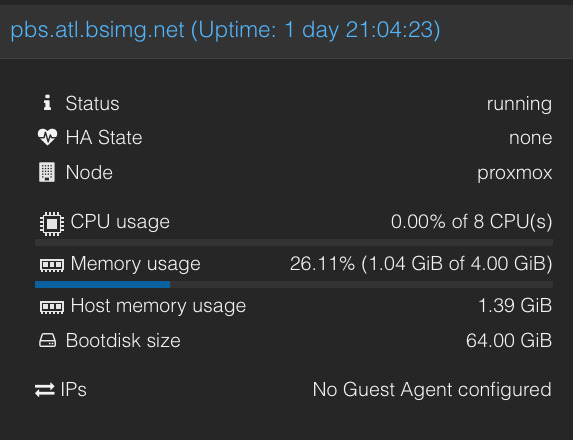
<small>Figure 1</small>
I configured a Debian 13 server on a dedicated server I use for most services I host and a spare IP address. The plan being to have the domain I recently bought for this project `bsimg.net` be the apex domain since it was available, surprisingly. Then I'd configure `pbs.bsimg.net` as a used in the images and `pbs.atl.bsimg.net` as a region-specific name for the box itself. I'm hoping to to later add more boxes in other regions so configuring this now future proofs for sure.
## The Upload Workflow
The workflow seems like it could be fairly easy when I'm working on an article or just this site in general.
If I need to upload an image I just use the following command in my terminal on my Mac that uses a BASH script to upload a screenshot or image.
`bash-upload Screenshot\ 2026-09-18\ at\ 06.48.44.png`
That image file was the original name of Figure 1 and it hashed the name on upload. I'll probably put that script up on my [cgit](https://git.bensanders.net) instance later.
## Next Steps
Now that I have one node configured for this service. My plans are to copy the config files and try putting them on another node in another region.
## Final Thoughts
That'll will be it for this post but I do plan to write on this site more often as I work on projects. Hopefully somebody else finds my musings useful.
<small>~Ben</small>
|
